
Every renewal of a subscription is a normal Shopify order. RecurX doesn't keep a separate order queue: you find a subscriber's past renewals on their page in Subscribers, the renewals coming up in the Calendar, and renewals that were skipped or needed extra checks in Reports. This guide shows where each one is.
Before you start: Calendar and Reports are part of the Pro plan. Payment history on the subscriber's page is on every plan.
Step 1: See a subscriber's past orders
- In your Shopify admin, open Apps → RecurX Subscriptions.
- Go to Subscriptions → Subscribers and click the subscriber.
- Scroll to Payment history. Each row is a charge, with its Date, Amount and Status (Paid, Failed, Pending or Refunded).
- Click View order to open that renewal order in Shopify.
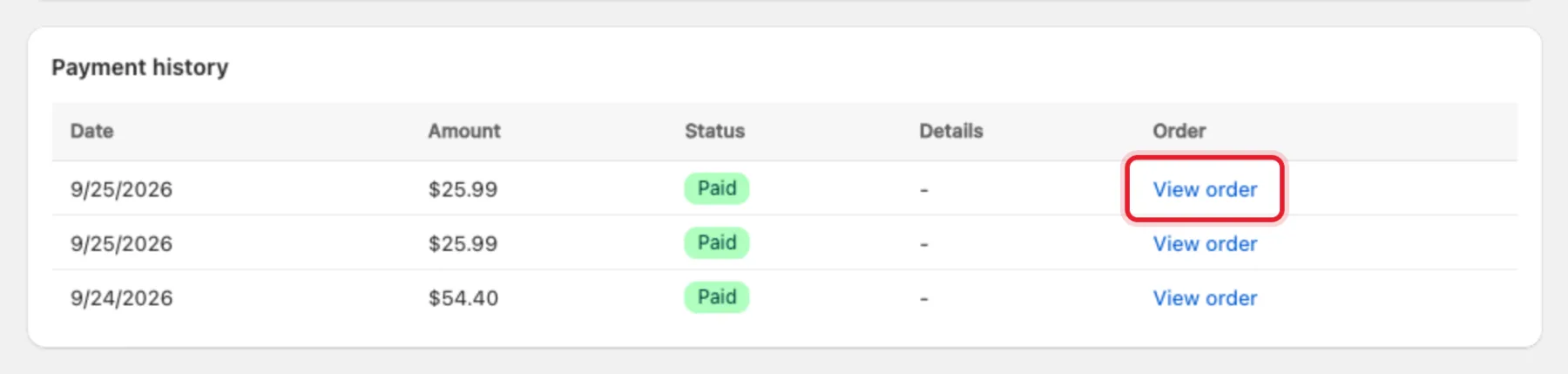
Tip: View order at the top of the subscriber's page opens the first order, the one where the customer subscribed.
Step 2: Check when the next order is due
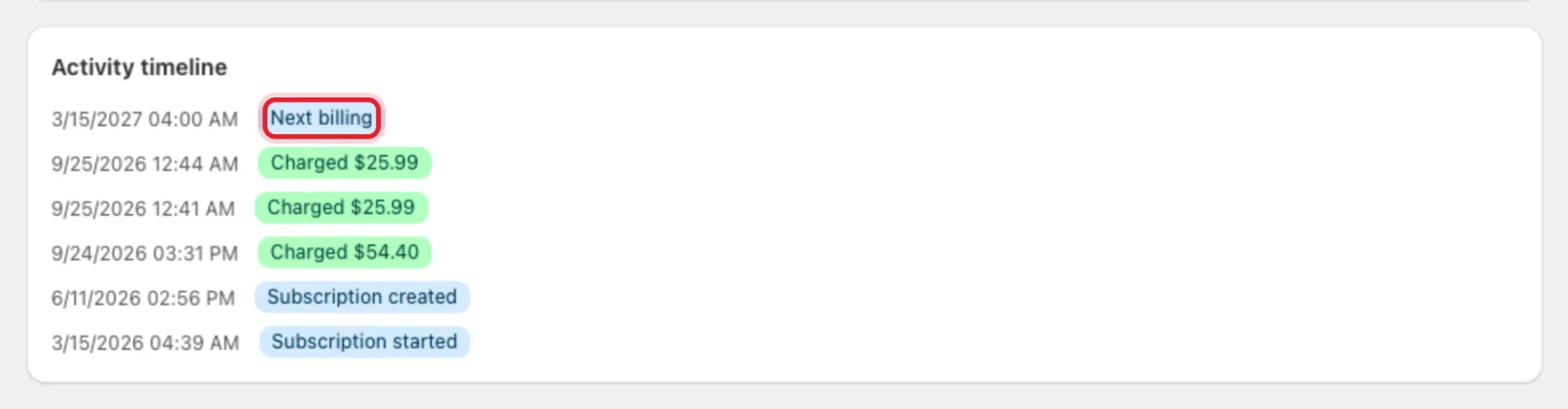
The Activity timeline on the same page lists the charges, skips and pauses in order. The top entry, Next billing, is the date of the next renewal order. You also see it as Next billing in Subscription details.
Step 3: See all upcoming orders on the Calendar
- On the Subscribers page, click More actions → Calendar.
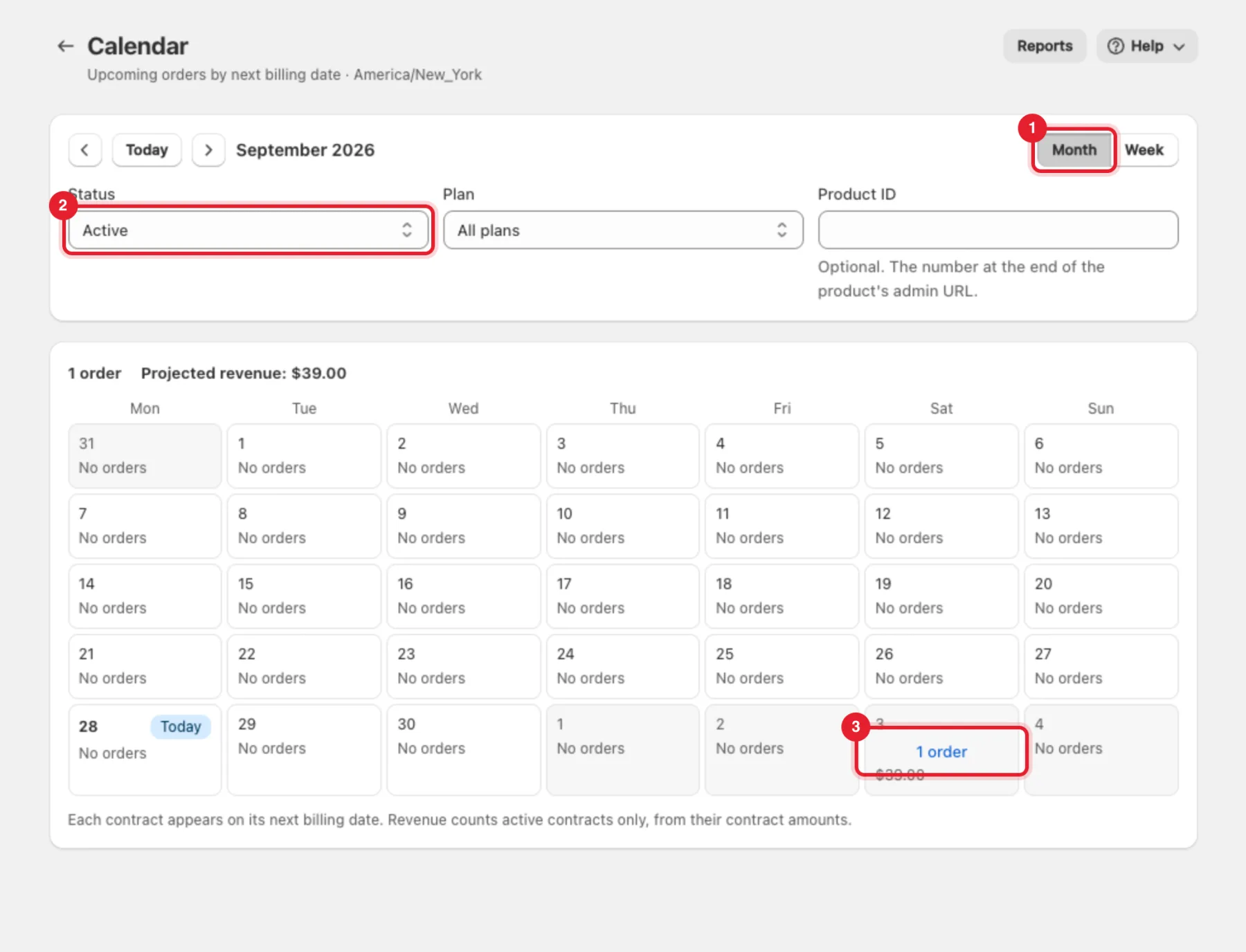
- Switch between Month and Week (1). Use the arrows and Today to move between periods.
- Narrow the view with Status (2), Plan or a Product ID (the number at the end of the product's admin URL).
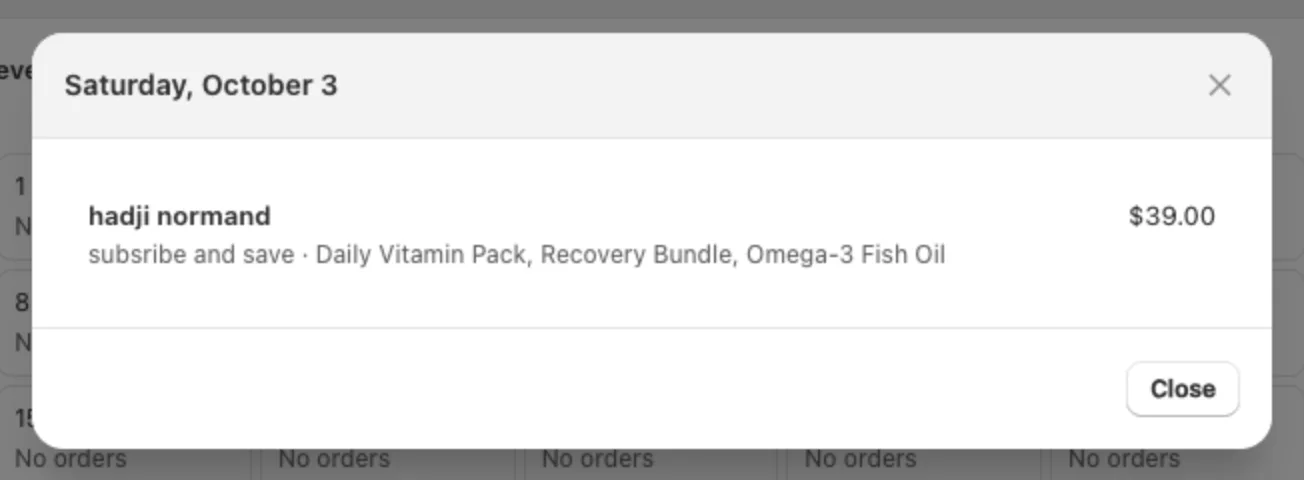
- Each day shows how many orders are due and the projected revenue. Click a day (3) to see its orders.
The day opens as a list: customer, plan, products and amount. Click a row to open that subscriber.
Note: Each subscription appears on its next billing date only. Projected revenue counts active subscriptions from their contract amounts. Dates use your store's time zone.
Step 4: Review skipped and challenged renewals in Reports
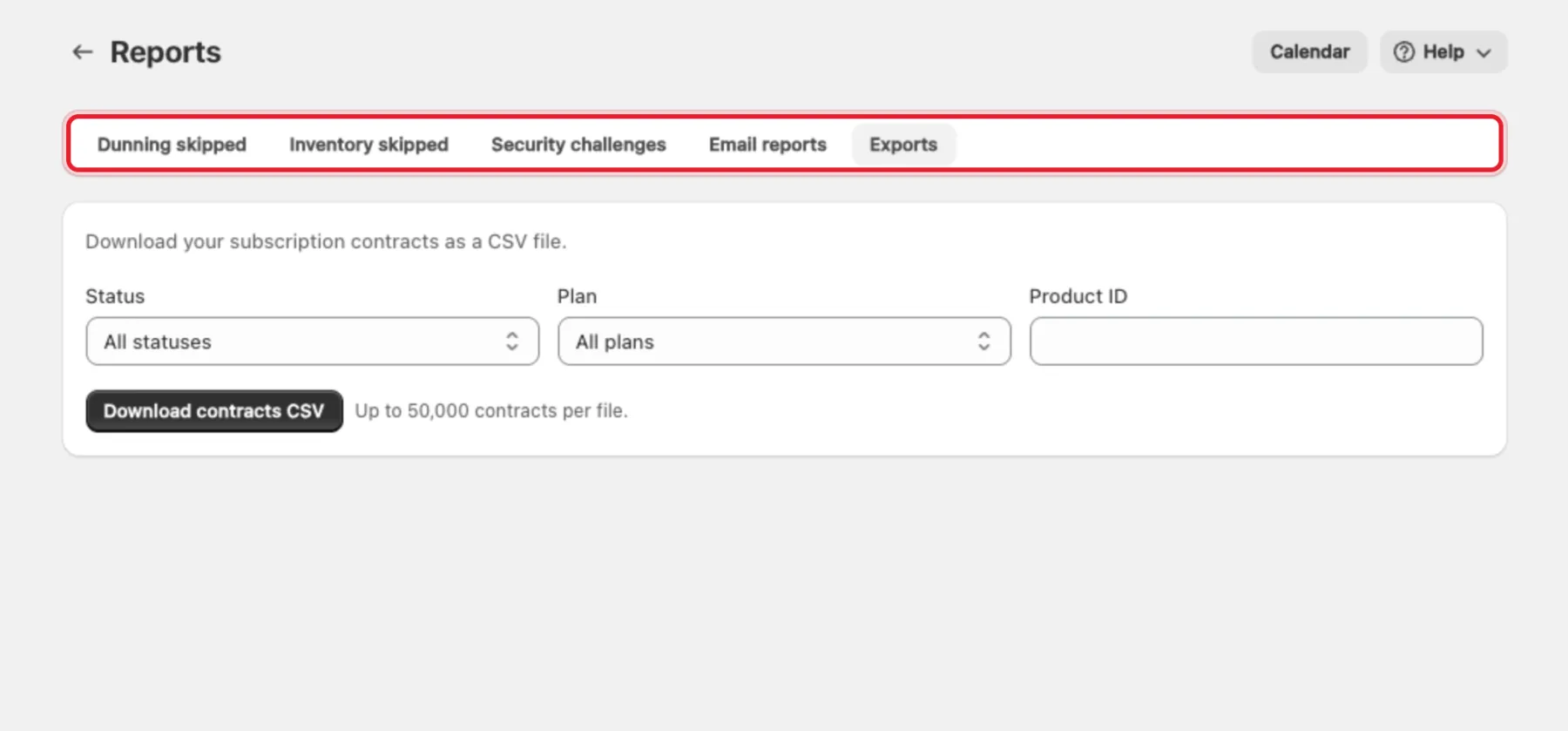
Click More actions → Reports on the Subscribers page (or Reports at the top of the Calendar). Each tab has a From and To date and an Export CSV button:
- Dunning skipped — orders that were skipped or cancelled because every payment retry failed.
- Inventory skipped — renewals skipped because a product was out of stock. These are recorded once renewal stock checks are turned on.
- Security challenges — renewals where the customer had to confirm the payment with their bank (3D Secure).
- Email reports — a daily or weekly summary email to up to 5 addresses.
- Exports — Download contracts CSV, filtered by status, plan or product (up to 50,000 contracts per file).
Step 5: Change an upcoming order
Upcoming orders are changed on the subscription, from the subscriber's page:
- Skip the next order — Manage → Skip next delivery.
- Move it to another day — Manage → Change billing date.
- Change what's in it — Manage → Swap product variant, Change quantity or Change shipping address.
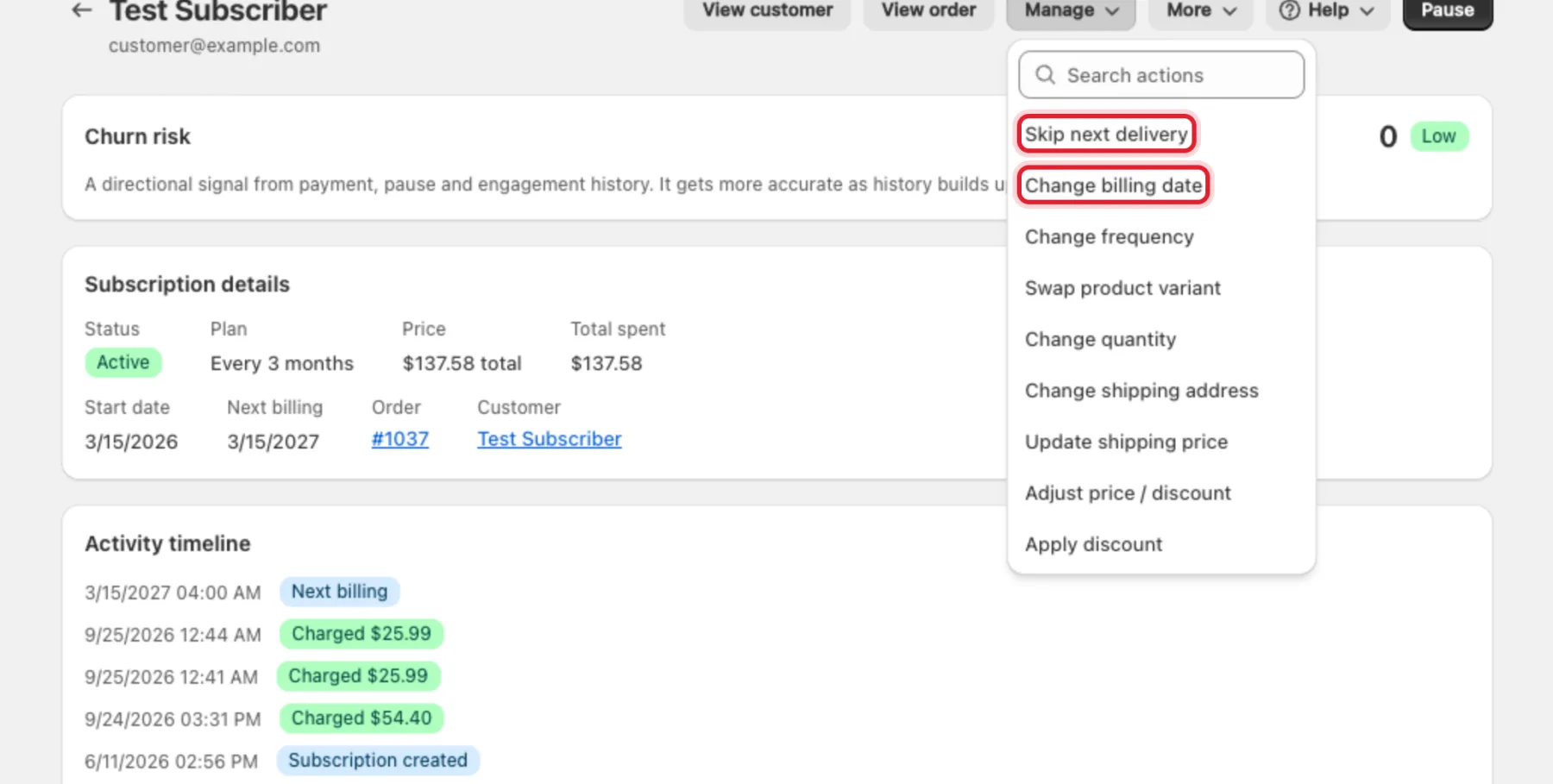
Step-by-step instructions with screenshots are in Manage subscribers: skip, swap, pause, edit.
Charge a failed renewal now
When a renewal has failed, or the next order is due within a day, the subscriber's page offers Trigger billing now (it's the main button on a subscription with a failed payment, otherwise under More). RecurX asks Charge this subscription now? — Shopify then charges the saved payment method for the current cycle and creates the order.
Important: Shopify allows one charge per billing cycle and can't charge a cycle before its billing date. If the cycle is already paid, you'll see This billing cycle is already paid. Shopify allows one charge per cycle.
Failed payments are also retried automatically by Rescue Sequences — see Payment recovery (Rescue Sequences) and Reading failed payment retries.
Find renewal orders in Shopify Orders
RecurX tags subscription orders in Shopify so you can filter them in Orders:
- RecurX Subscriptions First Order — the order where the customer subscribed.
- RecurX Subscriptions Recurring Order — every renewal order.
These are the default tag names. You can change or turn them off in Tag rules. Refunds, fulfilment and order edits happen in Shopify as for any other order.
FAQ
Is there a Retry, Refund or bulk order queue in RecurX? No. Refund a renewal order from the order in Shopify. Use Trigger billing now (Step 6) for a single failed renewal; Rescue Sequences retry failed payments automatically.
Why doesn't an order appear on the Calendar? Paused and payment-failed subscriptions are hidden unless you pick them under Status. Cancelled subscriptions have no upcoming orders.